Skip to content

Research Agent for Trading Algorithms installer · version 1.1.19

Minimum requirements: Local AI running on a minimum 8 GB VRAM graphics card.

Windows

After install, open the Agent page at http://localhost:54322.

What you set-up

1

Sign in

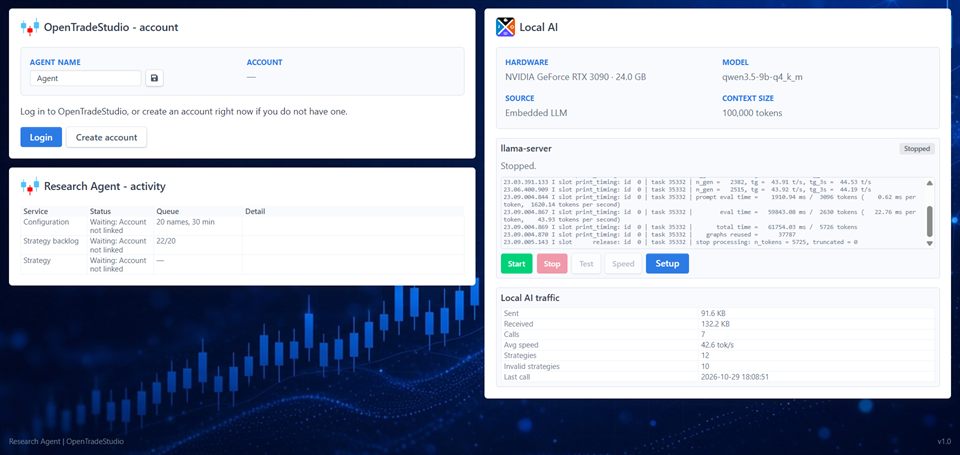
On Overview, name the Agent and sign in with your OpenTradeStudio account. That registers this computer as your simulator.

2

Set up Local AI

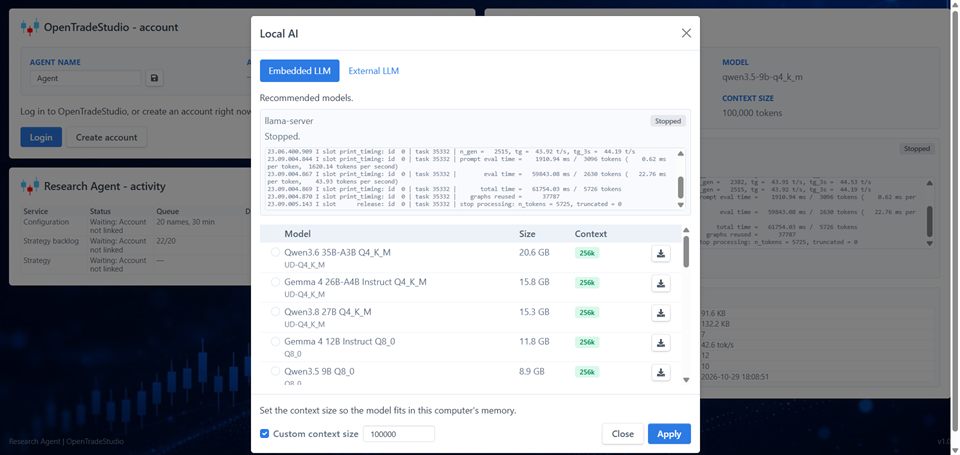
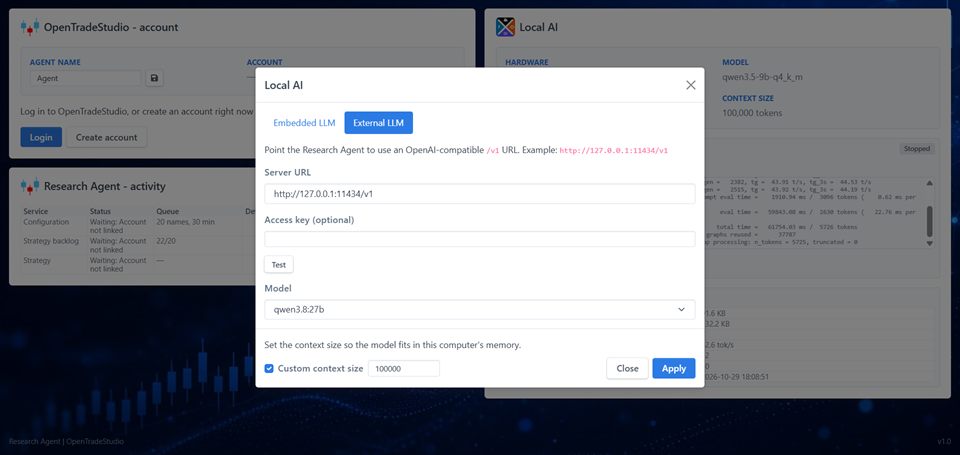
On Overview, open Local AI. Download a model for this computer, or point at one already running on your network. Then press Apply.

OpenTradeStudio, page by page

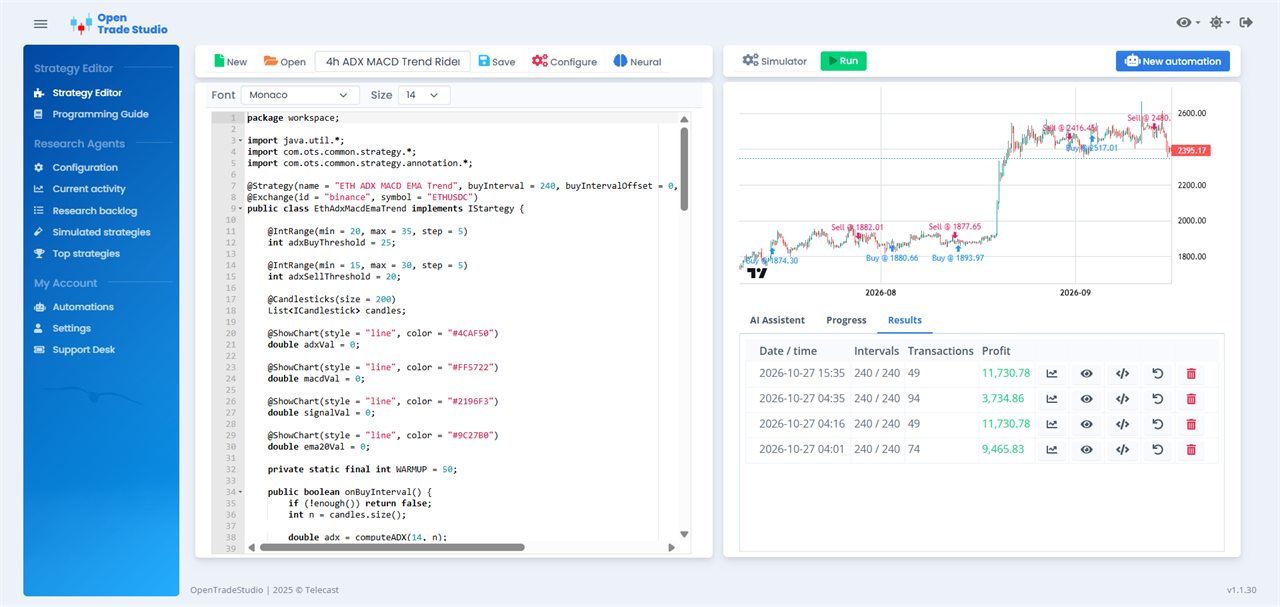
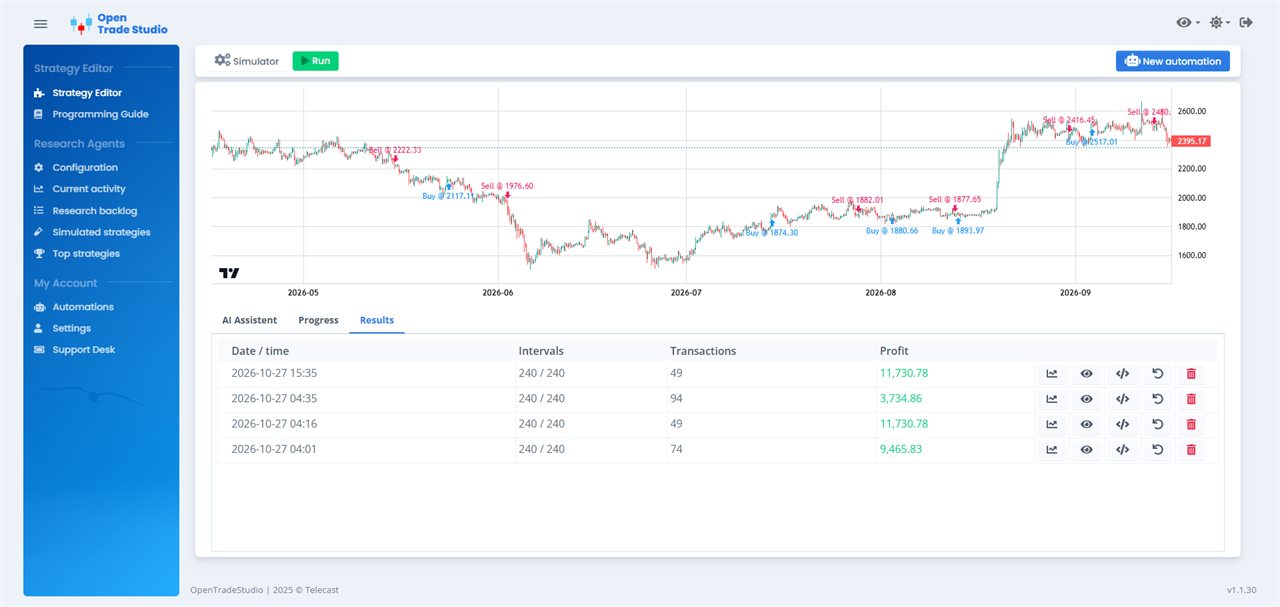
Strategy Editor. Write the buy and sell rules in Java. The code stays on the left. The chart on the right draws the candles and marks each buy and each sell from a simulation.
STRATEGY EDITOR

Strategy Editor

Write the buy and sell rules in Java. The code stays on the left. The chart on the right draws the candles and marks each buy and each sell from a simulation.

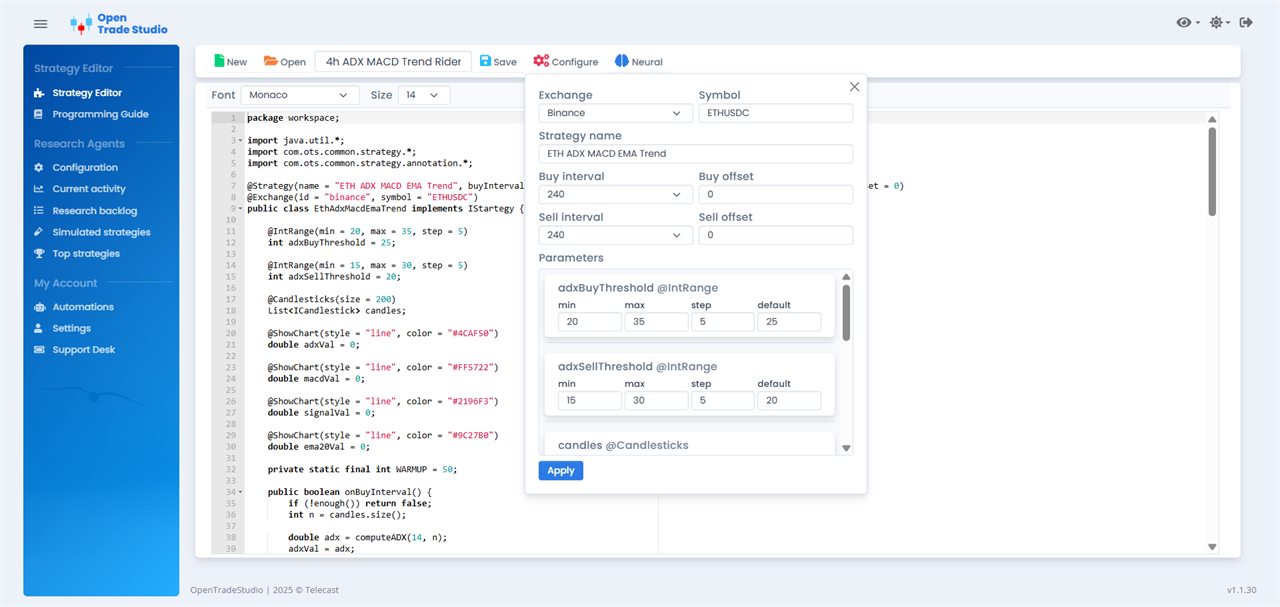
Start from a template, or open a strategy Research Agent already wrote. Configure sets the market, the symbol, and the intervals. The assistant, on the same local model as the Agent, explains the code and can edit it. A syntax check runs before a simulation, so a broken rule is caught on this page.

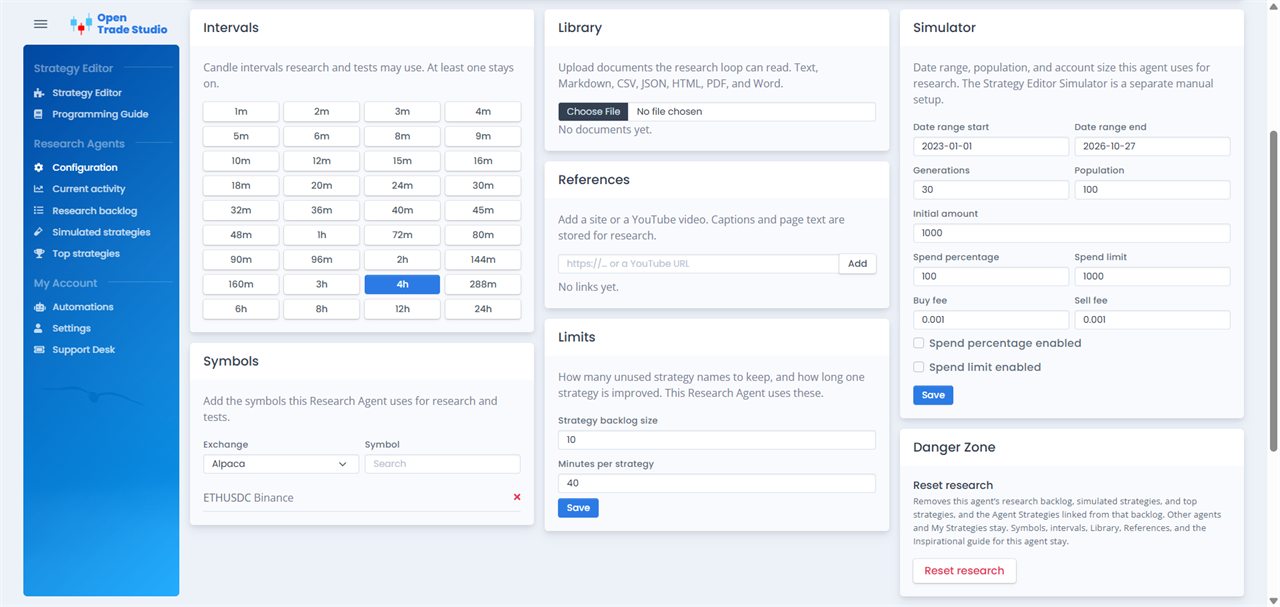
Configuration. This is where Research Agent is aimed. Choose the candle intervals and the symbols it may search. A new agent starts on the 4-hour interval. Set how many ideas may wait, and how many minutes it may spend on one strategy. The default is about an hour.
RESEARCH AGENTS

Configuration

This is where Research Agent is aimed. Choose the candle intervals and the symbols it may search. A new agent starts on the 4-hour interval. Set how many ideas may wait, and how many minutes it may spend on one strategy. The default is about an hour.

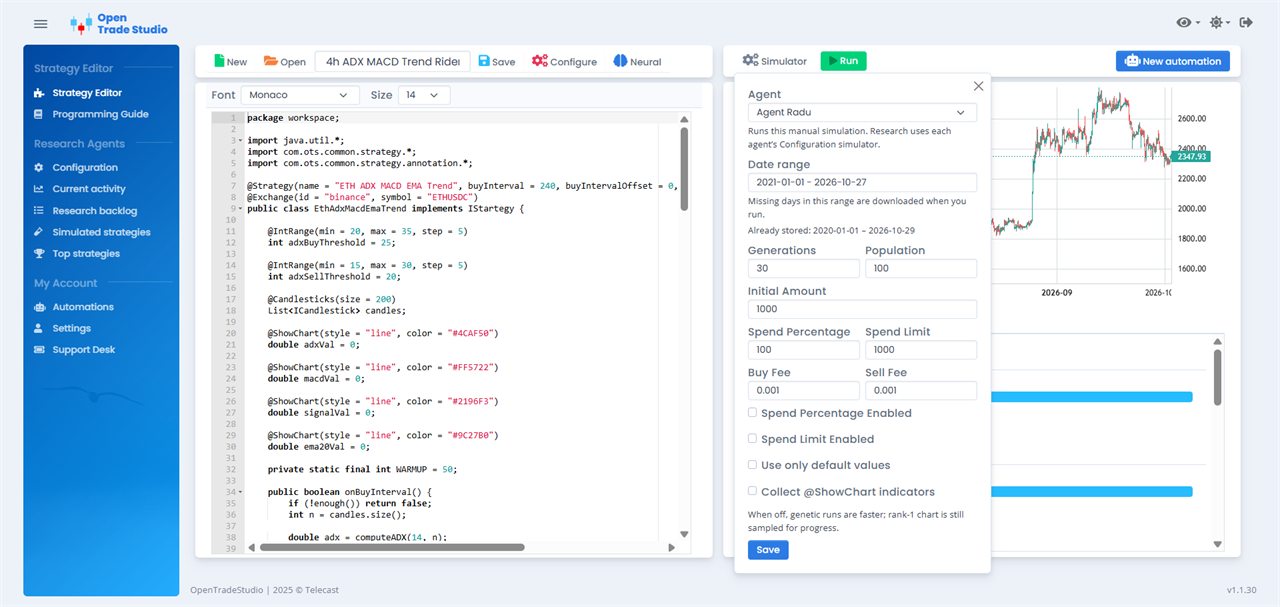
Upload a document, add a link or a YouTube video, or write a note, and the Agent uses that as source material. The date range, starting amount, and fees on this page apply to its research runs. Enable starts the search. Disable stops it. A simulation you start yourself in the Strategy Editor still runs.

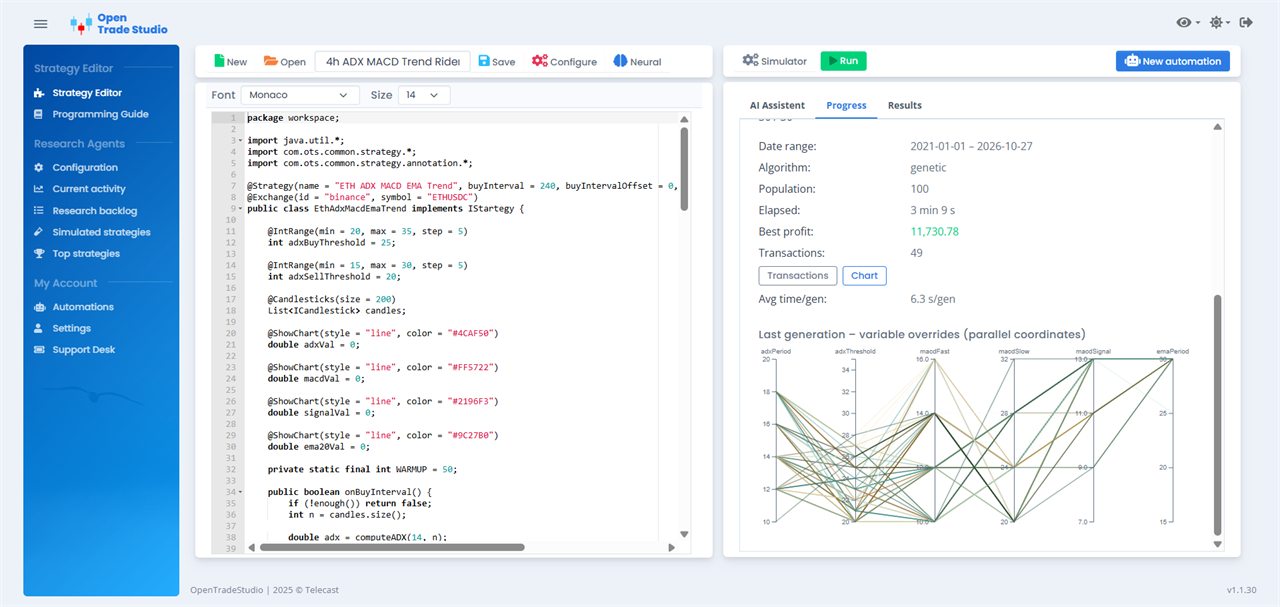
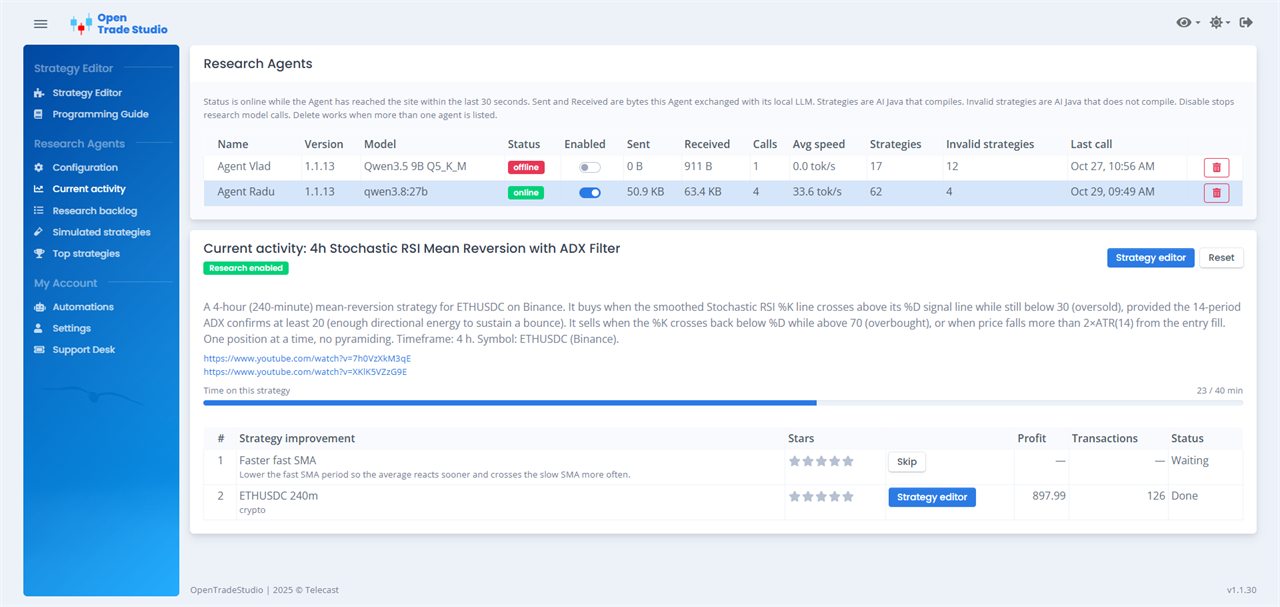
Current activity. The strategy the selected Agent is working on right now: its name, the improvement it is writing, and the profit and number of trades from the runs so far.
RESEARCH AGENTS

Current activity

The strategy the selected Agent is working on right now: its name, the improvement it is writing, and the profit and number of trades from the runs so far.

A clock shows how long this strategy has been in its window. When that time is up, a simulation still running is stopped and the Agent moves on to the next idea. If the computer is offline, this page keeps the last saved activity.

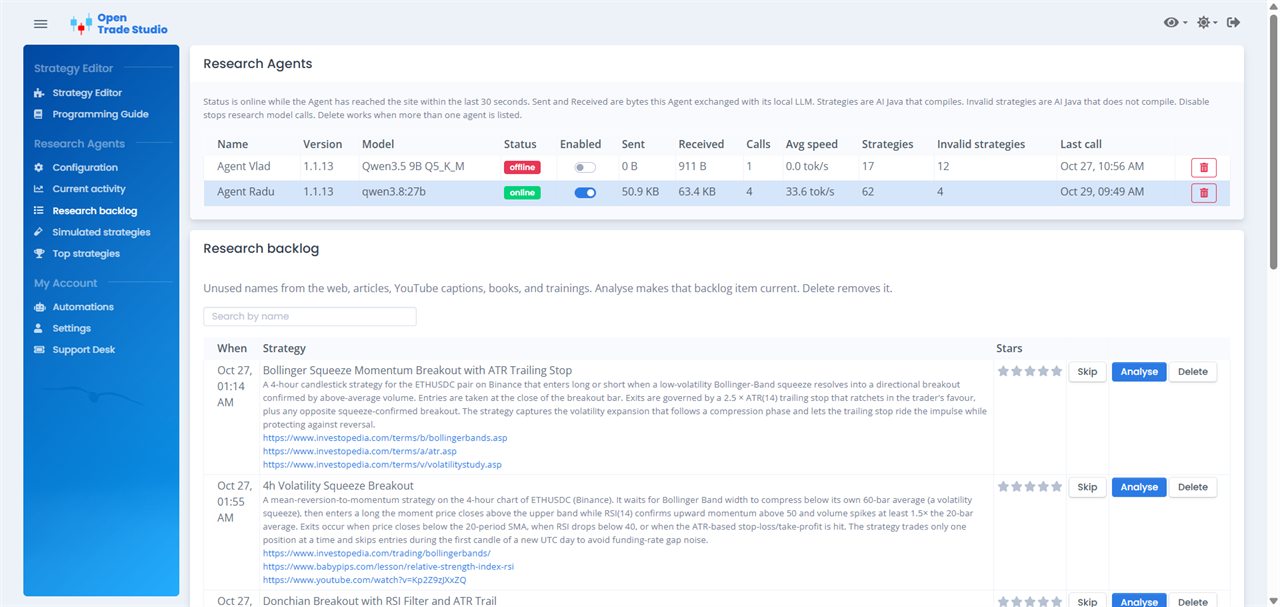
Research backlog. Ideas Research Agent has collected and not run yet. They come from the web, from articles and YouTube, and from the documents, links, and notes on Configuration. Each row is a written idea, waiting its turn. The oldest ideas are listed first.
RESEARCH AGENTS

Research backlog

Ideas Research Agent has collected and not run yet. They come from the web, from articles and YouTube, and from the documents, links, and notes on Configuration. Each row is a written idea, waiting its turn. The oldest ideas are listed first.

Star an idea to bring it forward. Skip one to leave it out of the queue. Analyse asks the Agent to take that idea next and turn it into code. A name search filters the list.

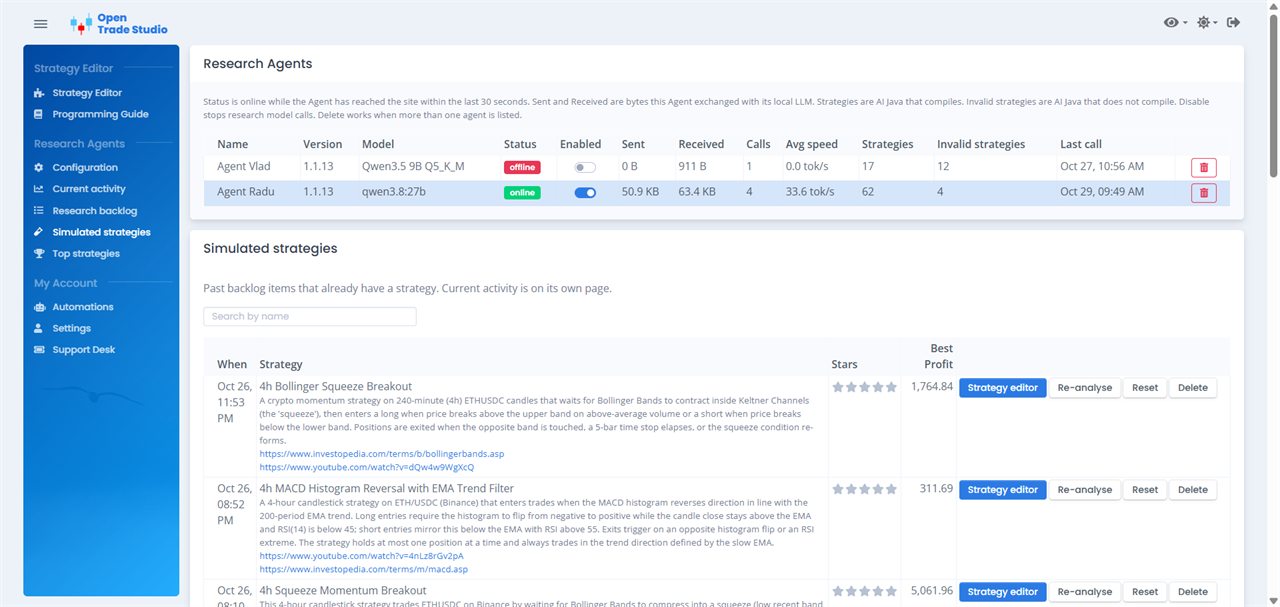
Simulated strategies. Every strategy the Agent has already researched, newest first. Each row shows the best profit that strategy reached, and the run that produced it.
RESEARCH AGENTS

Simulated strategies

Every strategy the Agent has already researched, newest first. Each row shows the best profit that strategy reached, and the run that produced it.

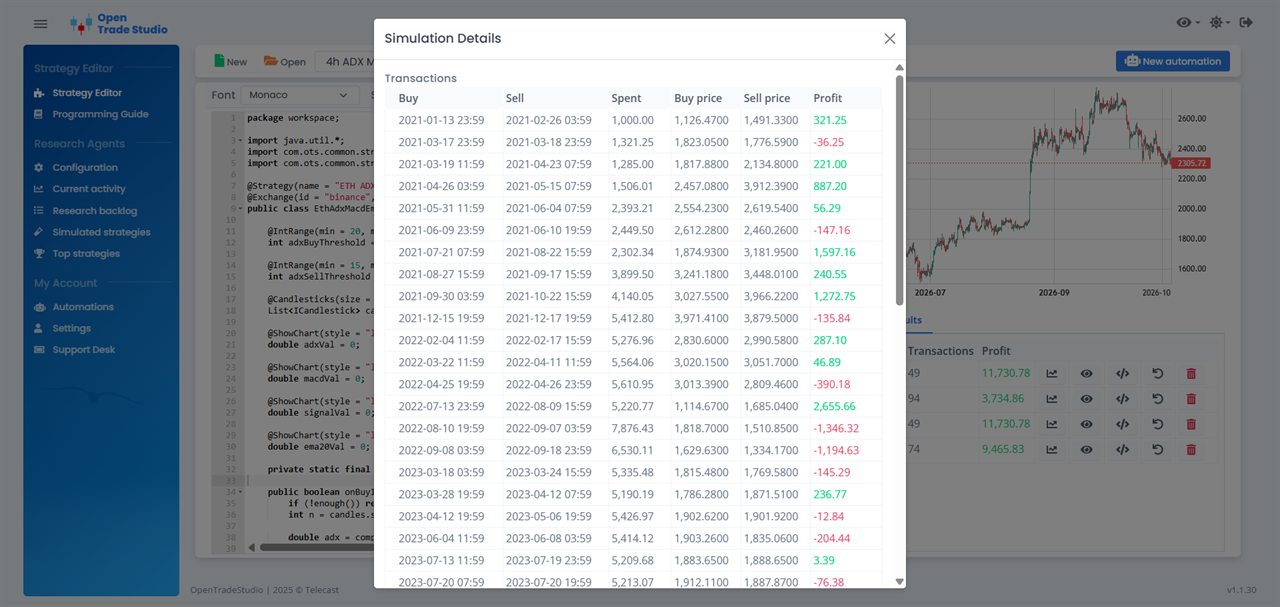
Open it in the Strategy Editor to read the Java, change it, and test it again on another range. Re-analyse sends the idea back to the Agent for another pass. The list stays on the website when the Agent is offline.

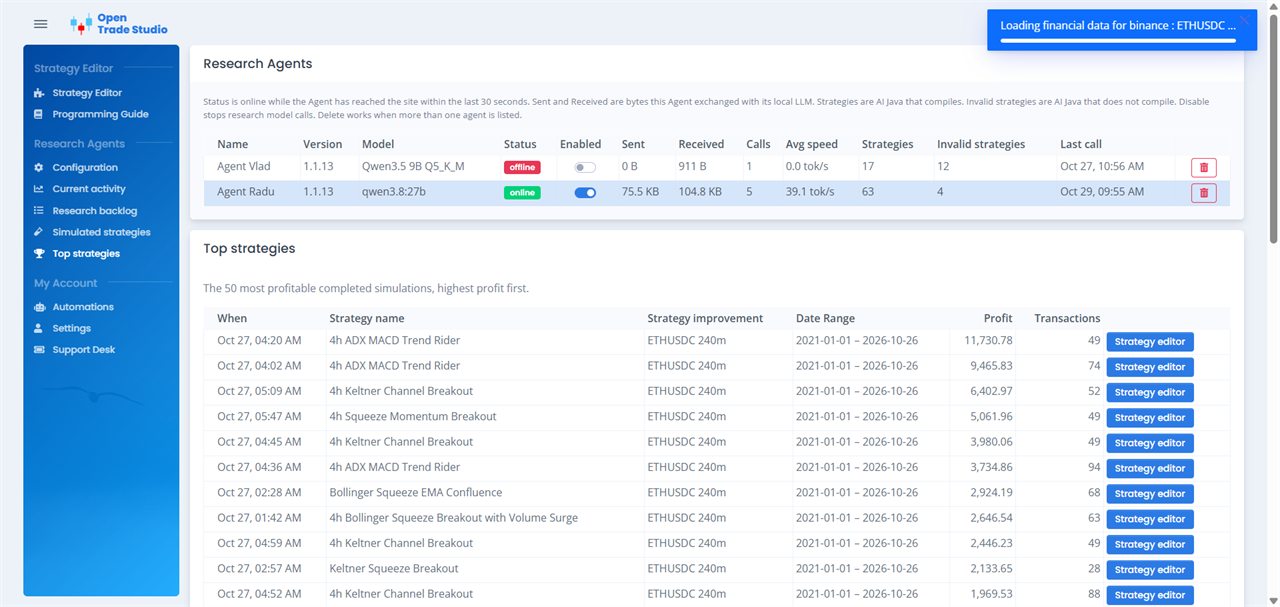
Top strategies. The finished simulations that came out ahead, ranked by profit, best first. Each row names the strategy, the improvement, the date range, the profit, and the number of trades.
RESEARCH AGENTS

Top strategies

The finished simulations that came out ahead, ranked by profit, best first. Each row names the strategy, the improvement, the date range, the profit, and the number of trades.

Open the winning run in the Strategy Editor and decide whether it is worth fine-tuning. The profit is how those rules behaved on past candles. It is a way to compare versions, not a promise about the next trade.

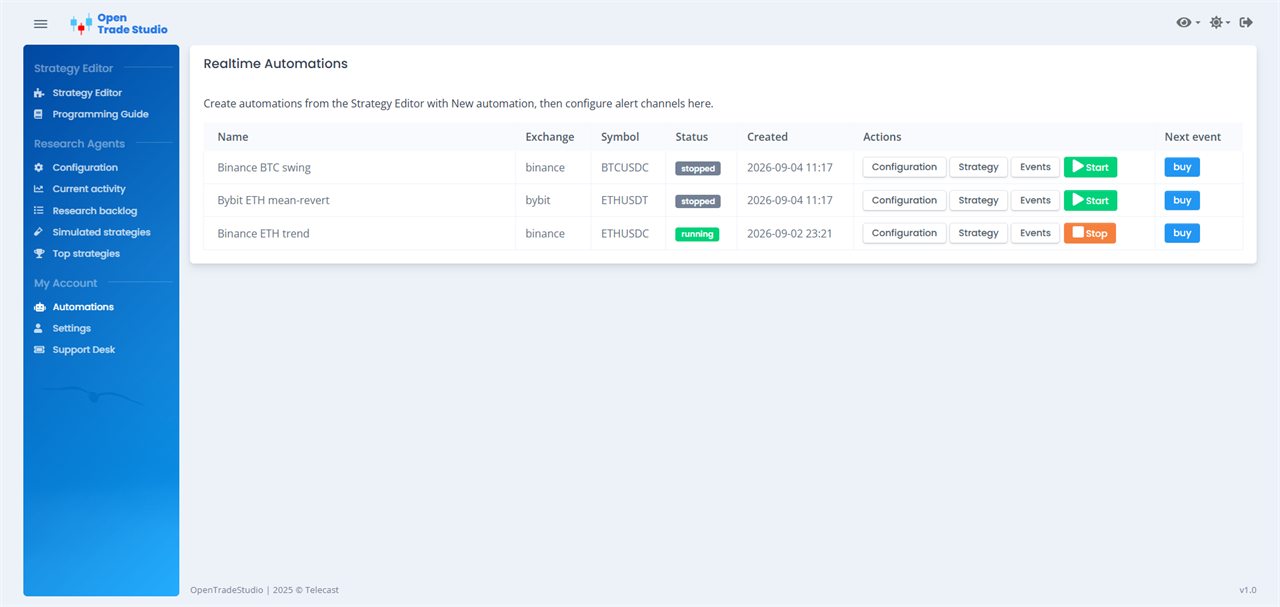
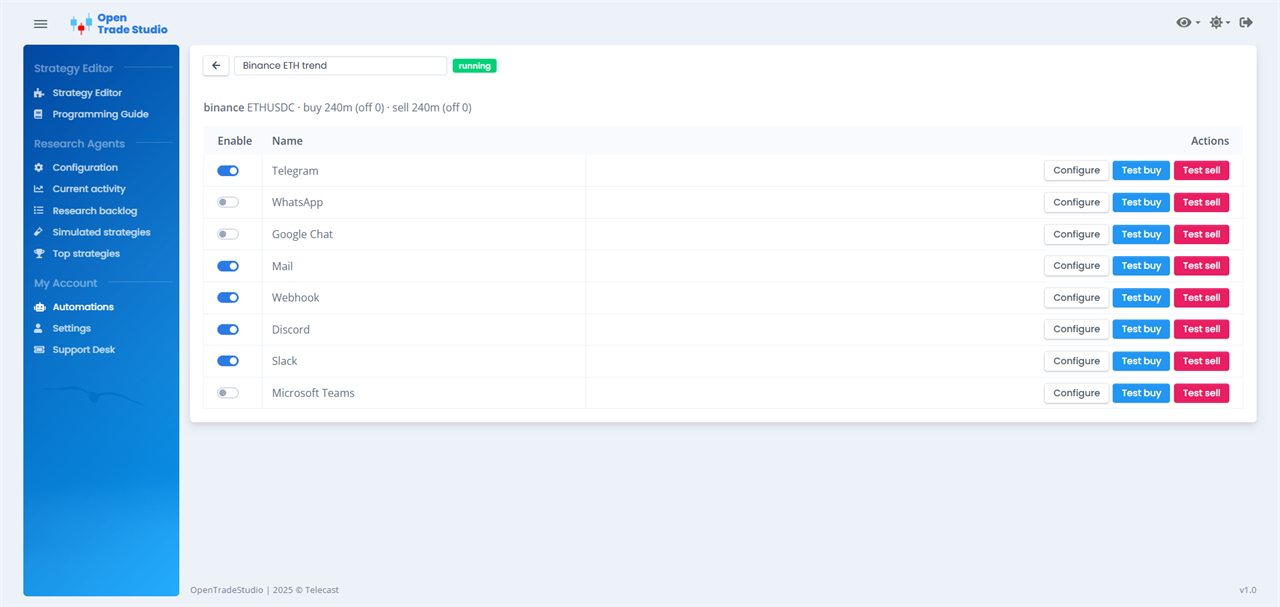
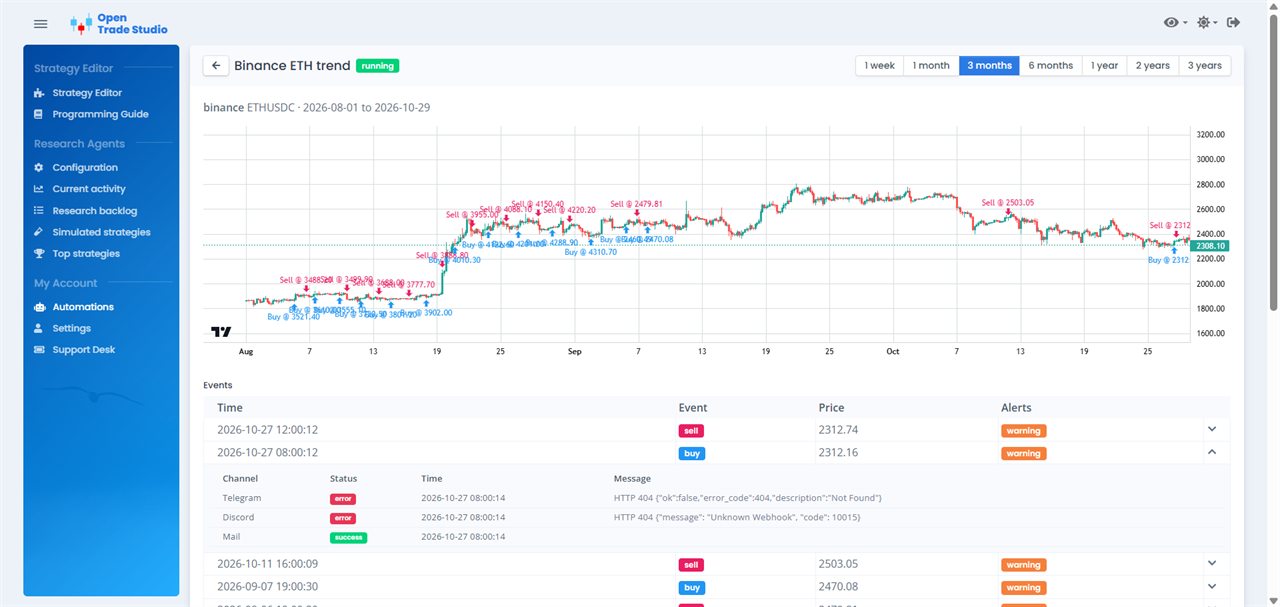
Automations. A strategy you chose, running on the website against live market data. Research Agent does not run this page. When the rules say buy or sell, OpenTradeStudio sends that event. It never places the order. Your own script, bot, or AI agent does that.
MY ACCOUNT

Automations

A strategy you chose, running on the website against live market data. Research Agent does not run this page. When the rules say buy or sell, OpenTradeStudio sends that event. It never places the order. Your own script, bot, or AI agent does that.

Turn on the channels you actually read: Telegram, WhatsApp, Google Chat, Mail, Webhook, Discord, Slack, or Microsoft Teams. Send a test buy or a test sell before you start the automation. The events list shows each signal and whether the alert arrived.

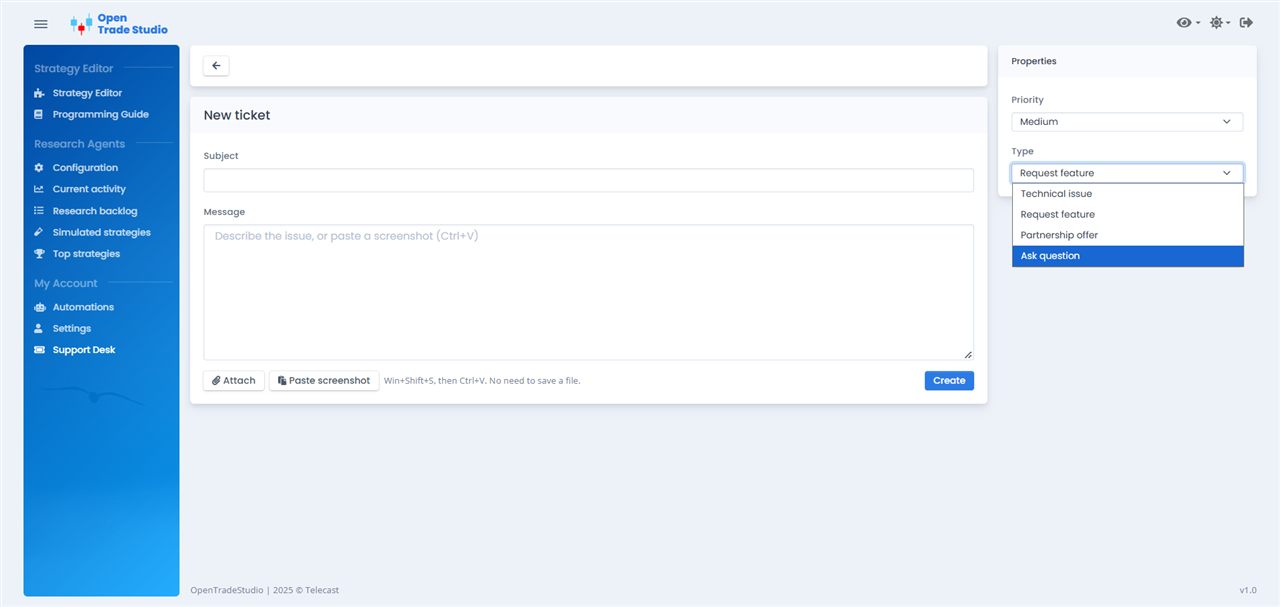
Support Desk. Open a ticket when something is wrong, you have a question, or you want a feature. Set a priority and a type, write what happened, and send it.
MY ACCOUNT

Support Desk

Open a ticket when something is wrong, you have a question, or you want a feature. Set a priority and a type, write what happened, and send it.

Attach a file, or paste a screenshot straight from the clipboard. The reply thread stays on the ticket, and you can close it when the answer is enough.

Basics of OpenTradeStudio

A strategy is a small program that decides when to buy and when to sell. These four ideas stay under every simulation, every improvement, and every live signal.

01

Rules

The strategy answers “buy?” and “sell?”. The answer is true or false, written down so the same question can be asked again.

02

Intervals

You choose how often each question is asked, in minutes. A buy can be checked every 4 hours and a sell every 15 minutes.

03

Candles

Before each question, the engine hands over the latest candles: open, high, low, close, and volume.

04

Trades & profit

A buy opens a position. The next sell closes it. That pair is one trade, and the simulator adds every trade over the period you test.

Why the rules stay written

The Turtle traders

In 1983 Richard Dennis bet his partner that trading could be taught. He trained novices for two weeks, handed them one written trend-following rulebook, and gave them capital to trade. The Wall Street Journal later reported that a group of them compounded about 80% a year over four and a half years. Everyone had the same rules. The ones who kept following them through the losing stretches made the money. The ones who skipped a rule when it felt wrong were dropped. Dennis said you could publish the rules in the newspaper and almost nobody would follow them. The key is consistency and discipline.

Follow the rules and stay consistent, and over the long term that is what succeeds.

Darvas boxes

Nicolas Darvas was a dancer, touring the world, so quotes reached him by telegram. He stopped trading tips and wrote one box rule. The top of a box is a high that holds for three days. The bottom is a low that holds for three days. Buy only when price breaks above the box, and place a stop just under it. When a higher box forms, move the stop up with it. In How I Made $2,000,000 in the Stock Market (1960) he describes making that money by taking every stop and letting the winning boxes run, even while he was on stage somewhere else.

Follow the rules and stay consistent, and over the long term that is what succeeds.

Donchian channels

Richard Donchian started one of the first public commodity funds, in 1949, and published a trend letter for nearly twenty years. His four-week rule is one sentence: buy a new four-week high, and sell a new four-week low. Two people looking at the same chart get the same order, so nothing is left to decide in the moment. Most signals are small losses, because markets only trend part of the time. The profit is in the few large moves, which means taking the next signal after a string of losers instead of quitting the rule.

Follow the rules and stay consistent, and over the long term that is what succeeds.

Frequently asked questions

The whole research chain is free. Research Agent runs on your computer, searches for strategies, writes them, and simulates them. The studio that comes after it is free too: fine-tuning a strategy the Agent found, testing it again, and reading the results.

Automations is free too, while OpenTradeStudio is in Public Beta. There is no payment and no credit balance. The free period is how we test this infrastructure with real use. An account can create up to 5 automations. Each one sends buy and sell signals to the channels you configure. Future post-beta value: $49/month. Current price: $0.

No. Most people do not have time to write Java, and the product is not built around that. Research Agent is the start of the chain: install it, and it searches for strategies, writes the code, and tests each one. You come back to the studio only for a strategy it already found — to fine-tune it, to test it again, or to set the channels that will receive events when the website runs it.

Startup templates are available if you want to try a rule by hand. Example: open a moving-average template and edit it yourself. That works. It is not the main idea. The main idea is that Research Agent does the search, and the studio is the place for the few results worth a second look.

You do not have to sit and watch. Install Research Agent, sign in, set up Local AI, and it starts searching. It works one strategy at a time, about an hour each by default, and only when you want it to. Research is switched on or off from Configuration, so the Agent can run for an evening and stay off the rest of the week.

Example: turn it on after dinner and off before sleep. In those hours it has searched, simulated, and left the better ideas in the studio. When you have a minute, open one there to fine-tune it or test it on another range. A startup template can be run by hand in the editor. That is the manual path, and it is not the one this product is built on.

What makes the search efficient is a faster, smarter Local AI. Research Agent calls that model again and again, so the hardware decides both how smart the model can be and how fast each request comes back. Better hardware runs a smarter model and finishes those requests sooner. An embedded model needs a graphics card with at least 8 GB of VRAM, or the Agent can use llama.cpp or Ollama already running on your network. Keep the context size inside what that computer can hold.

A cloud AI is faster and smarter, and it is not advised. Research Agent keeps calling the model for hours. In about 8 hours that can use up every token in a monthly subscription. Local AI is the setup this product is built on.

A smaller job finishes sooner. Example: BTCUSDC over the last two years, for two hours, goes further than every crypto pair and ten years of history in the same evening. Notes, a document, a link, or a YouTube transcript tell the Agent what to look for. On the Research backlog, star what should run next and skip the rest.

You do not stay at the screen. The Agent works in the stretches you choose. The studio is where you come back to fine-tune what it found, not where the search starts.

Research Agent searches on crypto from Binance, US stocks and ETFs from Alpaca, and forex, metals, and oil from OANDA, down to 1-minute bars. The free Alpaca stock feed is delayed by 15 minutes. Symbols and intervals are set once, in Configuration, and the Agent uses them while it searches. The buy question and the sell question can use different intervals.

Example: leave the Agent on EURUSD, a buy check every 4 hours and a sell check every 15 minutes. It brings the strategies back to the studio. There you can point one of them at AAPL or at gold and test it again. That second test is fine-tuning. The search itself belongs to Research Agent.

Scalping means taking many very small moves and getting out in seconds or a few minutes. Traders who scalp usually watch a 1-minute or 5-minute chart and may place dozens of trades in a session. Each win is tiny, so the spread, the fee, and a late fill can erase it. On a chart that fast, a lot of what looks like a signal is noise: the price ticks up and down without a move that lasts.

OpenTradeStudio can ask a strategy every minute, because the history goes down to 1-minute bars. That does not make scalping a good job for Research Agent. The Agent would spend its hour testing rules that fire on noise, then bring back a pile of trades that look busy and mean little. Scalping is not advised. Set the interval longer, and let the Agent search for a move that is still there after the noise has passed.

Day trading means opening and closing in the same session. Nothing is held overnight. A day trader might buy in the morning and sell 45 minutes later, often working from a 5-minute or 15-minute chart, sometimes a 1-hour chart for the direction of the day. It sits between scalping and a multi-day hold: fewer trades than a scalper, and no overnight gap.

Maybe. The intervals can be set that way — 15 minutes, 30 minutes, an hour — and Research Agent will search with whatever you configure. Day trading itself has not been tested here, so there is no result to stand on. If you try it, treat what comes back as an experiment: fine-tune it in the studio and run it again before you let the website trade it live. The style this product has actually measured is the slower one, in the next answer.

Swing trading holds for a few days or a few weeks, long enough to catch a move and short enough that you are not waiting months. Published practice uses hourly, 4-hour, and daily charts for that. A 4-hour candle already smooths out a lot of the noise that fills a 1-minute chart, so a buy or a sell is a decision about the swing, not about the last tick.

Yes. This is the style to give Research Agent. On OpenTradeStudio the intervals that have returned the best results are 3 hours and 4 hours — 180 minutes and 240 minutes in Configuration. Example: set the buy check to 4 hours and leave the Agent on that symbol for the evening. It searches for rules that survive that candle, not rules that flicker inside it. Bring the better ones into the studio, test them again, and only then decide whether the website should run one live.

No. Research Agent only researches. It never holds money and it never places an order. A strategy it found does not go live on the Agent’s computer. The chain splits there: the studio is where you fine-tune the strategy and configure the channels, and the website — not the Agent — runs that strategy on live data and sends the buy or sell event.

Example: Research Agent finds a rule. You fine-tune it in the studio and set Telegram. You turn the strategy on on OpenTradeStudio. The site posts “buy”. A script you run reads that message and sends the order to your broker. If that script is off, nothing is traded.

A result from Research Agent shows how those rules behaved on past candles. It is one step in the chain, not a promise about the next year. Fees, slippage, and a delayed stock feed are not the same as a live fill.

Example: the Agent can bring back a rule that bought every dip through 2023. That same rule can lose in a year that does not dip the same way. Before the website runs it, open it in the studio and test it again on another range. Use the profit and the number of trades to compare versions. What the Agent found is research. The live run, if you choose one, is a later step on the website.

Go live with Automations

Everything above is free. Automations is for the moment a strategy has convinced you and you want it to drive real trades through your own order executor.

01

Run on live data

Your strategy watches the market around the clock on OpenTradeStudio.

02

Signals go to your channels

When it says buy or sell, OpenTradeStudio sends the signal to Telegram, WhatsApp, Google Chat, Mail, Webhook, Discord, Slack, or Microsoft Teams.

03

Your order executor trades

Software you run — a script, a bot, or an AI agent — listens to those channels and places the orders with your broker. OpenTradeStudio never holds funds or places orders.

Public Beta

$49 $0 / month

The Research Agent, the studio, and Automations are free while OpenTradeStudio is in “Public Beta”. There is no payment and no credit balance. An account can create up to 5 automations. OpenTradeStudio does not place orders. It sends signals.

We are here to build a community, improve and test the platform that exists today, and take feedback from real users. A YouTube channel is in progress, to explain more clearly how this platform works.

Create account Open Automations

Let your computer research while you sleep.

  • 5 min Setup.
  • 5 min Configure the Agent.
  • 1 day Let it run. There is a good chance you get strategies you can rely on.
  • 5 min Create an automation. Configure it and test it. Then you get the signals for when to buy and when to sell.
Windows

© 2026 OpenTradeStudio. All rights reserved.

v1.1.22